Docker Config Reference (docker help)
Docker Config Super Reference (docker help)

docker help
docker --help
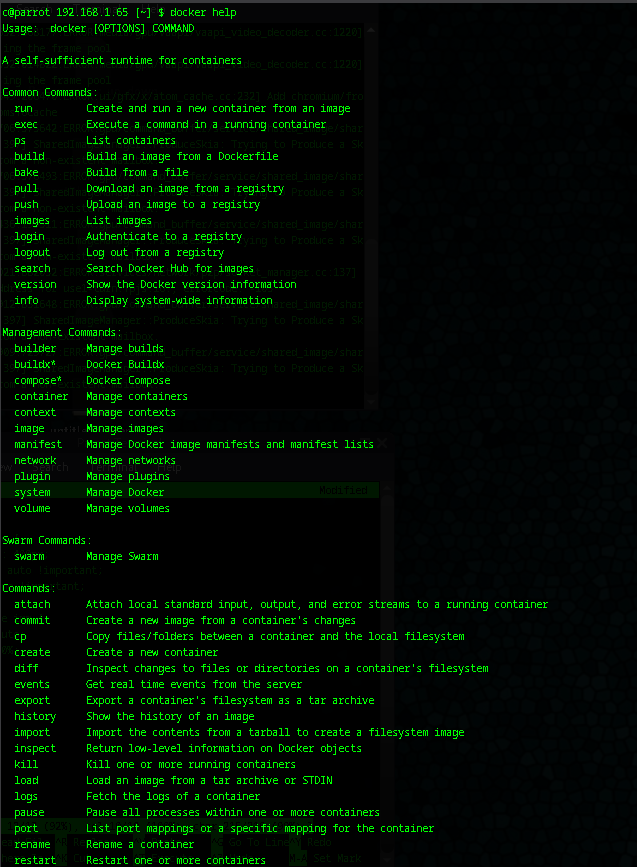
This command displays the general help overview for the Docker CLI, listing all available commands, options, and usage instructions, which is essential for users seeking an introduction to Docker's core functionality in any new or unfamiliar environment.
docker run
docker run --help
This command provides detailed help for the "run" subcommand, including syntax, options like port mapping and volume mounting, and examples, aiding users in understanding how to create and start containers effectively.
Aliases:
  docker container run, docker run

Options:
      --add-host list                    Add a custom host-to-IP mapping (host:ip)
      --annotation map                   Add an annotation to the container (passed through to the OCI runtime)
                                         (default map[])
  -a, --attach list                      Attach to STDIN, STDOUT or STDERR
      --blkio-weight uint16              Block IO (relative weight), between 10 and 1000, or 0 to disable (default 0)
      --blkio-weight-device list         Block IO weight (relative device weight) (default [])
      --cap-add list                     Add Linux capabilities
      --cap-drop list                    Drop Linux capabilities
      --cgroup-parent string             Optional parent cgroup for the container
      --cgroupns string                  Cgroup namespace to use (host|private)
                                         'host':    Run the container in the Docker host's cgroup namespace
                                         'private': Run the container in its own private cgroup namespace
                                         '':        Use the cgroup namespace as configured by the
                                                    default-cgroupns-mode option on the daemon (default)
      --cidfile string                   Write the container ID to the file
      --cpu-period int                   Limit CPU CFS (Completely Fair Scheduler) period
      --cpu-quota int                    Limit CPU CFS (Completely Fair Scheduler) quota
      --cpu-rt-period int                Limit CPU real-time period in microseconds
      --cpu-rt-runtime int               Limit CPU real-time runtime in microseconds
  -c, --cpu-shares int                   CPU shares (relative weight)
      --cpus decimal                     Number of CPUs
      --cpuset-cpus string               CPUs in which to allow execution (0-3, 0,1)
      --cpuset-mems string               MEMs in which to allow execution (0-3, 0,1)
  -d, --detach                           Run container in background and print container ID
      --detach-keys string               Override the key sequence for detaching a container
      --device list                      Add a host device to the container
      --device-cgroup-rule list          Add a rule to the cgroup allowed devices list
      --device-read-bps list             Limit read rate (bytes per second) from a device (default [])
      --device-read-iops list            Limit read rate (IO per second) from a device (default [])
      --device-write-bps list            Limit write rate (bytes per second) to a device (default [])
      --device-write-iops list           Limit write rate (IO per second) to a device (default [])
      --dns list                         Set custom DNS servers
      --dns-option list                  Set DNS options
      --dns-search list                  Set custom DNS search domains
      --domainname string                Container NIS domain name
      --entrypoint string                Overwrite the default ENTRYPOINT of the image
  -e, --env list                         Set environment variables
      --env-file list                    Read in a file of environment variables
      --expose list                      Expose a port or a range of ports
      --gpus gpu-request                 GPU devices to add to the container ('all' to pass all GPUs)
      --group-add list                   Add additional groups to join
      --health-cmd string                Command to run to check health
      --health-interval duration         Time between running the check (ms|s|m|h) (default 0s)
      --health-retries int               Consecutive failures needed to report unhealthy
      --health-start-interval duration   Time between running the check during the start period (ms|s|m|h) (default 0s)
      --health-start-period duration     Start period for the container to initialize before starting health-retries
                                         countdown (ms|s|m|h) (default 0s)
      --health-timeout duration          Maximum time to allow one check to run (ms|s|m|h) (default 0s)
      --help                             Print usage
  -h, --hostname string                  Container host name
      --init                             Run an init inside the container that forwards signals and reaps processes
  -i, --interactive                      Keep STDIN open even if not attached
      --ip ip                            IPv4 address (e.g., 172.30.100.104)
      --ip6 ip                           IPv6 address (e.g., 2001:db8::33)
      --ipc string                       IPC mode to use
      --isolation string                 Container isolation technology
  -l, --label list                       Set meta data on a container
      --label-file list                  Read in a line delimited file of labels
      --link list                        Add link to another container
      --link-local-ip list               Container IPv4/IPv6 link-local addresses
      --log-driver string                Logging driver for the container
      --log-opt list                     Log driver options
      --mac-address string               Container MAC address (e.g., 92:d0:c6:0a:29:33)
  -m, --memory bytes                     Memory limit
      --memory-reservation bytes         Memory soft limit
      --memory-swap bytes                Swap limit equal to memory plus swap: '-1' to enable unlimited swap
      --memory-swappiness int            Tune container memory swappiness (0 to 100) (default -1)
      --mount mount                      Attach a filesystem mount to the container
      --name string                      Assign a name to the container
      --network network                  Connect a container to a network
      --network-alias list               Add network-scoped alias for the container
      --no-healthcheck                   Disable any container-specified HEALTHCHECK
      --oom-kill-disable                 Disable OOM Killer
      --oom-score-adj int                Tune host's OOM preferences (-1000 to 1000)
      --pid string                       PID namespace to use
      --pids-limit int                   Tune container pids limit (set -1 for unlimited)
      --platform string                  Set platform if server is multi-platform capable
      --privileged                       Give extended privileges to this container
  -p, --publish list                     Publish a container's port(s) to the host
  -P, --publish-all                      Publish all exposed ports to random ports
      --pull string                      Pull image before running ("always", "missing", "never") (default "missing")
  -q, --quiet                            Suppress the pull output
      --read-only                        Mount the container's root filesystem as read only
      --restart string                   Restart policy to apply when a container exits (default "no")
      --rm                               Automatically remove the container and its associated anonymous volumes
                                         when it exits
      --runtime string                   Runtime to use for this container
      --security-opt list                Security Options
      --shm-size bytes                   Size of /dev/shm
      --sig-proxy                        Proxy received signals to the process (default true)
      --stop-signal string               Signal to stop the container
      --stop-timeout int                 Timeout (in seconds) to stop a container
      --storage-opt list                 Storage driver options for the container
      --sysctl map                       Sysctl options (default map[])
      --tmpfs list                       Mount a tmpfs directory
  -t, --tty                              Allocate a pseudo-TTY
      --ulimit ulimit                    Ulimit options (default [])
      --use-api-socket                   Bind mount Docker API socket and required auth
  -u, --user string                      Username or UID (format: <name|uid>[:<group|gid>])
      --userns string                    User namespace to use
      --uts string                       UTS namespace to use
  -v, --volume list                      Bind mount a volume
      --volume-driver string             Optional volume driver for the container
      --volumes-from list                Mount volumes from the specified container(s)
  -w, --workdir string                   Working directory inside the container
docker ps
docker ps --help
This command shows help for the "ps" subcommand, detailing options for listing containers, such as filtering by status or formatting output, which is valuable for monitoring running processes in operational scenarios.
c@parrot 192.168.1.65 [~] $ docker ps --help
Usage:  docker ps [OPTIONS]

List containers

Aliases:
  docker container ls, docker container list, docker container ps, docker ps

Options:
  -a, --all             Show all containers (default shows just running)
  -f, --filter filter   Filter output based on conditions provided
      --format string   Format output using a custom template:
                        'table':            Print output in table format with column headers (default)
                        'table TEMPLATE':   Print output in table format using the given Go template
                        'json':             Print in JSON format
                        'TEMPLATE':         Print output using the given Go template.
                        Refer to https://docs.docker.com/go/formatting/ for more information about formatting output
                        with templates
  -n, --last int        Show n last created containers (includes all states) (default -1)
  -l, --latest          Show the latest created container (includes all states)
      --no-trunc        Don't truncate output
  -q, --quiet           Only display container IDs
  -s, --size            Display total file sizes
c@parrot 192.168.1.65 [~] $
docker build
docker build --help
This command outputs help for the "build" subcommand, explaining parameters for constructing images from Dockerfiles, including caching and tagging, suitable for developers building custom images.
c@parrot 192.168.1.65 [~] $ docker ps --help
Usage:  docker ps [OPTIONS]

List containers

Aliases:
  docker container ls, docker container list, docker container ps, docker ps

Options:
  -a, --all             Show all containers (default shows just running)
  -f, --filter filter   Filter output based on conditions provided
      --format string   Format output using a custom template:
                        'table':            Print output in table format with column headers (default)
                        'table TEMPLATE':   Print output in table format using the given Go template
                        'json':             Print in JSON format
                        'TEMPLATE':         Print output using the given Go template.
                        Refer to https://docs.docker.com/go/formatting/ for more information about formatting output
                        with templates
  -n, --last int        Show n last created containers (includes all states) (default -1)
  -l, --latest          Show the latest created container (includes all states)
      --no-trunc        Don't truncate output
  -q, --quiet           Only display container IDs
  -s, --size            Display total file sizes
docker network
docker network --help
This command presents help for network management subcommands, covering creation, inspection, and removal of networks, which is critical in networked multi-container applications.
c@parrot 192.168.1.65 [~] $ docker network --help
Usage:  docker network COMMAND

Manage networks

Commands:
  connect     Connect a container to a network
  create      Create a network
  disconnect  Disconnect a container from a network
  inspect     Display detailed information on one or more networks
  ls          List networks
  prune       Remove all unused networks
  rm          Remove one or more networks

Run 'docker network COMMAND --help' for more information on a command.
docker volume
docker volume --help
This command displays help for volume-related operations, including creation, listing, and pruning, assisting in managing persistent data storage across container lifecycles.
c@parrot 192.168.1.65 [~] $ docker volume --help
Usage:  docker volume COMMAND

Manage volumes

Commands:
  create      Create a volume
  inspect     Display detailed information on one or more volumes
  ls          List volumes
  prune       Remove unused local volumes
  rm          Remove one or more volumes

Run 'docker volume COMMAND --help' for more information on a command.
docker image
docker image --help
This command provides help for image management, detailing subcommands for listing, removing, and saving images, useful for registry and storage optimization tasks.
Usage:  docker image COMMAND

Manage images

Commands:
  build       Build an image from a Dockerfile
  history     Show the history of an image
  import      Import the contents from a tarball to create a filesystem image
  inspect     Display detailed information on one or more images
  load        Load an image from a tar archive or STDIN
  ls          List images
  prune       Remove unused images
  pull        Download an image from a registry
  push        Upload an image to a registry
  rm          Remove one or more images
  save        Save one or more images to a tar archive (streamed to STDOUT by default)
  tag         Create a tag TARGET_IMAGE that refers to SOURCE_IMAGE

Run 'docker image COMMAND --help' for more information on a command.
docker container
docker container --help
This command shows help for container subcommands, such as start, stop, and exec, offering guidance for direct container manipulation in debugging contexts.
Usage:  docker container COMMAND

Manage containers

Commands:
  attach      Attach local standard input, output, and error streams to a running container
  commit      Create a new image from a container's changes
  cp          Copy files/folders between a container and the local filesystem
  create      Create a new container
  diff        Inspect changes to files or directories on a container's filesystem
  exec        Execute a command in a running container
  export      Export a container's filesystem as a tar archive
  inspect     Display detailed information on one or more containers
  kill        Kill one or more running containers
  logs        Fetch the logs of a container
  ls          List containers
  pause       Pause all processes within one or more containers
  port        List port mappings or a specific mapping for the container
  prune       Remove all stopped containers
  rename      Rename a container
  restart     Restart one or more containers
  rm          Remove one or more containers
  run         Create and run a new container from an image
  start       Start one or more stopped containers
  stats       Display a live stream of container(s) resource usage statistics
  stop        Stop one or more running containers
  top         Display the running processes of a container
  unpause     Unpause all processes within one or more containers
  update      Update configuration of one or more containers
  wait        Block until one or more containers stop, then print their exit codes

Run 'docker container COMMAND --help' for more information on a command.
c@parrot 192.168.1.65 [~] $
docker logs
docker logs --help
This command outputs help for retrieving container logs, including options for following output or timestamps, which is indispensable for troubleshooting application errors.
Usage:  docker logs [OPTIONS] CONTAINER

Fetch the logs of a container

Aliases:
  docker container logs, docker logs

Options:
      --details        Show extra details provided to logs
  -f, --follow         Follow log output
      --since string   Show logs since timestamp (e.g. "2013-01-02T13:23:37Z") or relative (e.g. "42m" for 42 minutes)
  -n, --tail string    Number of lines to show from the end of the logs (default "all")
  -t, --timestamps     Show timestamps
      --until string   Show logs before a timestamp (e.g. "2013-01-02T13:23:37Z") or relative (e.g. "42m" for 42 minutes)
c@parrot 192.168.1.65 [~] $
docker exec
docker exec --help
This command displays help for executing commands inside running containers, covering interactive modes and user specifications, ideal for runtime interventions.
c@parrot 192.168.1.65 [~] $ docker exec --help
Usage:  docker exec [OPTIONS] CONTAINER COMMAND [ARG...]

Execute a command in a running container

Aliases:
  docker container exec, docker exec

Options:
  -d, --detach               Detached mode: run command in the background
      --detach-keys string   Override the key sequence for detaching a container
  -e, --env list             Set environment variables
      --env-file list        Read in a file of environment variables
  -i, --interactive          Keep STDIN open even if not attached
      --privileged           Give extended privileges to the command
  -t, --tty                  Allocate a pseudo-TTY
  -u, --user string          Username or UID (format: "<name|uid>[:<group|gid>]")
  -w, --workdir string       Working directory inside the container
c@parrot 192.168.1.65 [~] $
docker cp
docker cp --help
This command provides help for copying files between containers and the host, explaining syntax for both directions, supporting data transfer in isolated environments.
Usage:  docker cp [OPTIONS] CONTAINER:SRC_PATH DEST_PATH|-
	docker cp [OPTIONS] SRC_PATH|- CONTAINER:DEST_PATH

Copy files/folders between a container and the local filesystem

Use '-' as the source to read a tar archive from stdin
and extract it to a directory destination in a container.
Use '-' as the destination to stream a tar archive of a
container source to stdout.

Aliases:
  docker container cp, docker cp

Options:
  -a, --archive       Archive mode (copy all uid/gid information)
  -L, --follow-link   Always follow symbol link in SRC_PATH
  -q, --quiet         Suppress progress output during copy. Progress output is automatically suppressed if no
                      terminal is attached
c@parrot 192.168.1.65 [~] $
docker commit
docker commit --help
This command shows help for committing container changes to a new image, including options for messages and authors, useful for creating custom images from modified states.
Usage:  docker commit [OPTIONS] CONTAINER [REPOSITORY[:TAG]]

Create a new image from a container's changes

Aliases:
  docker container commit, docker commit

Options:
  -a, --author string    Author (e.g., "John Hannibal Smith <hannibal@a-team.com>")
  -c, --change list      Apply Dockerfile instruction to the created image
  -m, --message string   Commit message
      --no-pause         Disable pausing container during commit
c@parrot 192.168.1.65 [~] $
docker diff
docker diff --help
This command outputs help for inspecting filesystem changes in containers, which is beneficial for auditing modifications in development or security reviews.
Usage:  docker diff CONTAINER

Inspect changes to files or directories on a container's filesystem

Aliases:
  docker container diff, docker diff
c@parrot 192.168.1.65 [~] $
docker events
docker events --help
This command displays help for streaming Docker events, with filters for types and scopes, enabling real-time system monitoring in production settings.
Usage:  docker events [OPTIONS]

Get real time events from the server

Aliases:
  docker system events, docker events

Options:
  -f, --filter filter   Filter output based on conditions provided
      --format string   Format output using a custom template:
                        'json':             Print in JSON format
                        'TEMPLATE':         Print output using the given Go template.
                        Refer to https://docs.docker.com/go/formatting/ for more information about formatting output
                        with templates
      --since string    Show all events created since timestamp
      --until string    Stream events until this timestamp
c@parrot 192.168.1.65 [~] $
docker export
docker export --help
This command provides help for exporting container filesystems to tar archives, assisting in backups or migrations without preserving image layers.
Usage:  docker export [OPTIONS] CONTAINER

Export a container's filesystem as a tar archive

Aliases:
  docker container export, docker export

Options:
  -o, --output string   Write to a file, instead of STDOUT
c@parrot 192.168.1.65 [~] $
docker history
docker history --help
This command shows help for viewing image layer history, including options for human-readable sizes, which aids in understanding image composition.
c@parrot 192.168.1.65 [~] $ docker history --help
Usage:  docker history [OPTIONS] IMAGE

Show the history of an image

Aliases:
  docker image history, docker history

Options:
      --format string     Format output using a custom template:
                          'table':            Print output in table format with column headers (default)
                          'table TEMPLATE':   Print output in table format using the given Go template
                          'json':             Print in JSON format
                          'TEMPLATE':         Print output using the given Go template.
                          Refer to https://docs.docker.com/go/formatting/ for more information about formatting
                          output with templates
  -H, --human             Print sizes and dates in human readable format (default true)
      --no-trunc          Don't truncate output
      --platform string   Show history for the given platform. Formatted as "os[/arch[/variant]]" (e.g., "linux/amd64")
  -q, --quiet             Only show image IDs
docker import
docker import --help
This command outputs help for importing tar archives as images, supporting changes like commands or entrypoints during import.
Usage:  docker import [OPTIONS] file|URL|- [REPOSITORY[:TAG]]

Import the contents from a tarball to create a filesystem image

Aliases:
  docker image import, docker import

Options:
  -c, --change list       Apply Dockerfile instruction to the created image
  -m, --message string    Set commit message for imported image
      --platform string   Set platform if server is multi-platform capable
c@parrot 192.168.1.65 [~] $
docker info
docker info --help
This command displays help for retrieving system-wide Docker information, useful for diagnosing host configurations and versions.
c@parrot 192.168.1.65 [~] $ docker info --help
Usage:  docker info [OPTIONS]

Display system-wide information

Aliases:
  docker system info, docker info

Options:
  -f, --format string   Format output using a custom template:
                        'json':             Print in JSON format
                        'TEMPLATE':         Print output using the given Go template.
                        Refer to https://docs.docker.com/go/formatting/ for more information about formatting output
                        with templates
c@parrot 192.168.1.65 [~] $
docker inspect
docker inspect --help
This command provides help for inspecting low-level details of Docker objects, with formatting options for JSON extraction in automation.
Usage:  docker inspect [OPTIONS] NAME|ID [NAME|ID...]

Return low-level information on Docker objects

Options:
  -f, --format string   Format output using a custom template:
                        'json':             Print in JSON format
                        'TEMPLATE':         Print output using the given Go template.
                        Refer to https://docs.docker.com/go/formatting/ for more information about formatting output
                        with templates
  -s, --size            Display total file sizes if the type is container
      --type string     Only inspect objects of the given type
c@parrot 192.168.1.65 [~] $
docker kill
docker kill --help
This command shows help for sending signals to containers, including custom signals, for controlled termination in unresponsive scenarios.
Usage:  docker kill [OPTIONS] CONTAINER [CONTAINER...]

Kill one or more running containers

Aliases:
  docker container kill, docker kill

Options:
  -s, --signal string   Signal to send to the container
c@parrot 192.168.1.65 [~] $
docker load
docker load --help
This command outputs help for loading images from tar archives, supporting input redirection for registry-independent transfers.
Usage:  docker load [OPTIONS]

Load an image from a tar archive or STDIN

Aliases:
  docker image load, docker load

Options:
  -i, --input string       Read from tar archive file, instead of STDIN
      --platform strings   Load only the given platform(s). Formatted as a comma-separated list of
                           "os[/arch[/variant]]" (e.g., "linux/amd64,linux/arm64/v8").
  -q, --quiet              Suppress the load output
c@parrot 192.168.1.65 [~] $
docker login
docker login --help
This command displays help for authenticating to registries, including username and password options, essential for secure image pushes and pulls.
c@parrot 192.168.1.65 [~] $ docker login --help
Usage:  docker login [OPTIONS] [SERVER]

Authenticate to a registry.
Defaults to Docker Hub if no server is specified.

Options:
  -p, --password string   Password or Personal Access Token (PAT)
      --password-stdin    Take the Password or Personal Access Token (PAT) from stdin
  -u, --username string   Username
c@parrot 192.168.1.65 [~] $
docker logout
docker logout --help
This command provides help for logging out from registries, ensuring credential revocation in shared or secure environments.
Usage:  docker logout [SERVER]

Log out from a registry.
If no server is specified, the default is defined by the daemon.
c@parrot 192.168.1.65 [~] $
docker pause / unpause
docker pause --help
This command shows help for pausing container processes, which is useful for temporary suspensions in resource management.
Usage:  docker pause CONTAINER [CONTAINER...]

Pause all processes within one or more containers

Aliases:
  docker container pause, docker pause
c@parrot 192.168.1.65 [~] $
docker port
docker port --help
This command outputs help for listing port mappings, aiding in network configuration verification.
c@parrot 192.168.1.65 [~] $ docker port --help
Usage:  docker port CONTAINER [PRIVATE_PORT[/PROTO]]

List port mappings or a specific mapping for the container

Aliases:
  docker container port, docker port
c@parrot 192.168.1.65 [~] $
docker rename
docker rename --help
This command displays help for renaming containers, supporting simple identifier changes for organization.
c@parrot 192.168.1.65 [~] $ docker rename --help
Usage:  docker rename CONTAINER NEW_NAME

Rename a container

Aliases:
  docker container rename, docker rename
c@parrot 192.168.1.65 [~] $
docker restart
docker restart --help
This command provides help for restarting containers, with timeout options for graceful handling.
Usage:  docker restart [OPTIONS] CONTAINER [CONTAINER...]

Restart one or more containers

Aliases:
  docker container restart, docker restart

Options:
  -s, --signal string   Signal to send to the container
  -t, --timeout int     Seconds to wait before killing the container
c@parrot 192.168.1.65 [~] $
docker rmi
docker rmi --help
This command shows help for removing images, including force options for dangling or tagged images.
Usage:  docker rmi [OPTIONS] IMAGE [IMAGE...]

Remove one or more images

Aliases:
  docker image rm, docker image remove, docker rmi

Options:
  -f, --force              Force removal of the image
      --no-prune           Do not delete untagged parents
      --platform strings   Remove only the given platform variant. Formatted as "os[/arch[/variant]]" (e.g.,
                           "linux/amd64")
c@parrot 192.168.1.65 [~] $
docker save
docker save --help
This command outputs help for saving images to tar archives, supporting multi-image exports for offline distribution.
c@parrot 192.168.1.65 [~] $ docker save --help
Usage:  docker save [OPTIONS] IMAGE [IMAGE...]

Save one or more images to a tar archive (streamed to STDOUT by default)

Aliases:
  docker image save, docker save

Options:
  -o, --output string      Write to a file, instead of STDOUT
      --platform strings   Save only the given platform(s). Formatted as a comma-separated list of
                           "os[/arch[/variant]]" (e.g., "linux/amd64,linux/arm64/v8")
c@parrot 192.168.1.65 [~] $
docker search
docker search --help
This command displays help for searching Docker Hub repositories, with filters for stars or official status, assisting in image discovery.
c@parrot 192.168.1.65 [~] $ docker search --help
Usage:  docker search [OPTIONS] TERM

Search Docker Hub for images

Options:
  -f, --filter filter   Filter output based on conditions provided
      --format string   Pretty-print search using a Go template
      --limit int       Max number of search results
      --no-trunc        Don't truncate output
c@parrot 192.168.1.65 [~] $